Want to get the most out of search on your High Availability GitHub Enterprise Server deployment? Reach out to support to get set up with our new search architecture!
How GitHub Enterprise Server's Search Architecture Was Rebuilt for High Availability
Mar 03, 2026
748 views
Search is the connective tissue running through nearly every surface of GitHub. The obvious touchpoints are there — search bars, issue filtering, pull request queries — but search also underpins the releases page, the projects board, issue and PR counts, and a surprising amount of the platform's core functionality. Because it's so deeply embedded, GitHub's engineering team has spent the past year hardening the search infrastructure that powers GitHub Enterprise Server. The goal: reduce operational overhead for administrators and eliminate the class of search-related failures that have quietly plagued HA deployments for years.
Historically, GitHub Enterprise Server administrators running High Availability configurations had to treat search indexes with considerable care. Search indexes — the specialized data structures optimized for fast full-text retrieval — were fragile under certain conditions. Performing maintenance or upgrade steps out of sequence could corrupt those indexes, trigger repair cycles, or worse, lock the system in a state that required manual intervention to resolve. For context, HA setups are designed to keep GitHub Enterprise Server operational even when individual components fail. A primary node handles all write operations and inbound traffic, while one or more replica nodes stay synchronized and stand ready to assume the primary role if a failover event occurs.
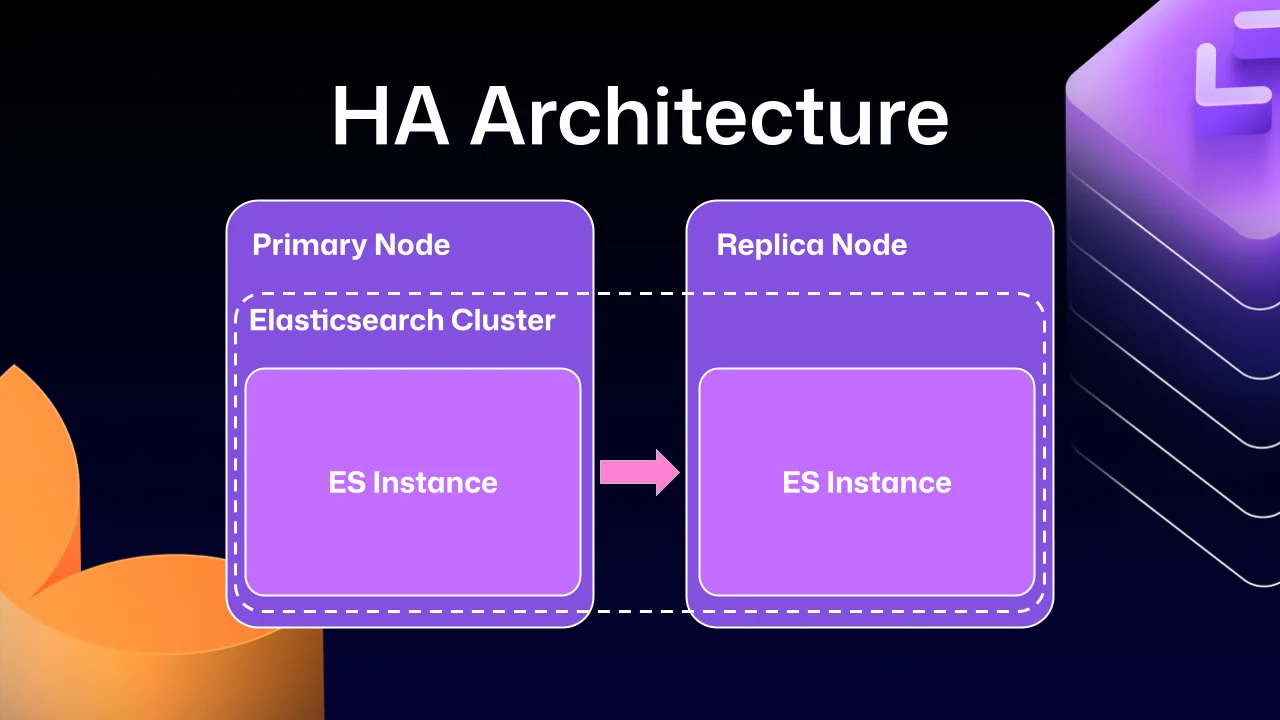
The root of the problem traces back to how earlier versions of Elasticsearch were integrated into the HA topology. GitHub Enterprise Server is built around a strict leader/follower model: the primary server owns all writes and mutations, while replicas are read-only by design. That constraint is baked into virtually every operational layer of the platform. Elasticsearch, however, didn't natively support this pattern. Without a built-in mechanism to designate one node as the authoritative write target and another as a passive follower, GitHub's engineering team had to bridge the gap by forming a single Elasticsearch cluster that spanned both the primary and replica nodes. This approach made data replication tractable and delivered a secondary benefit — each node could serve search requests locally, reducing cross-node latency.
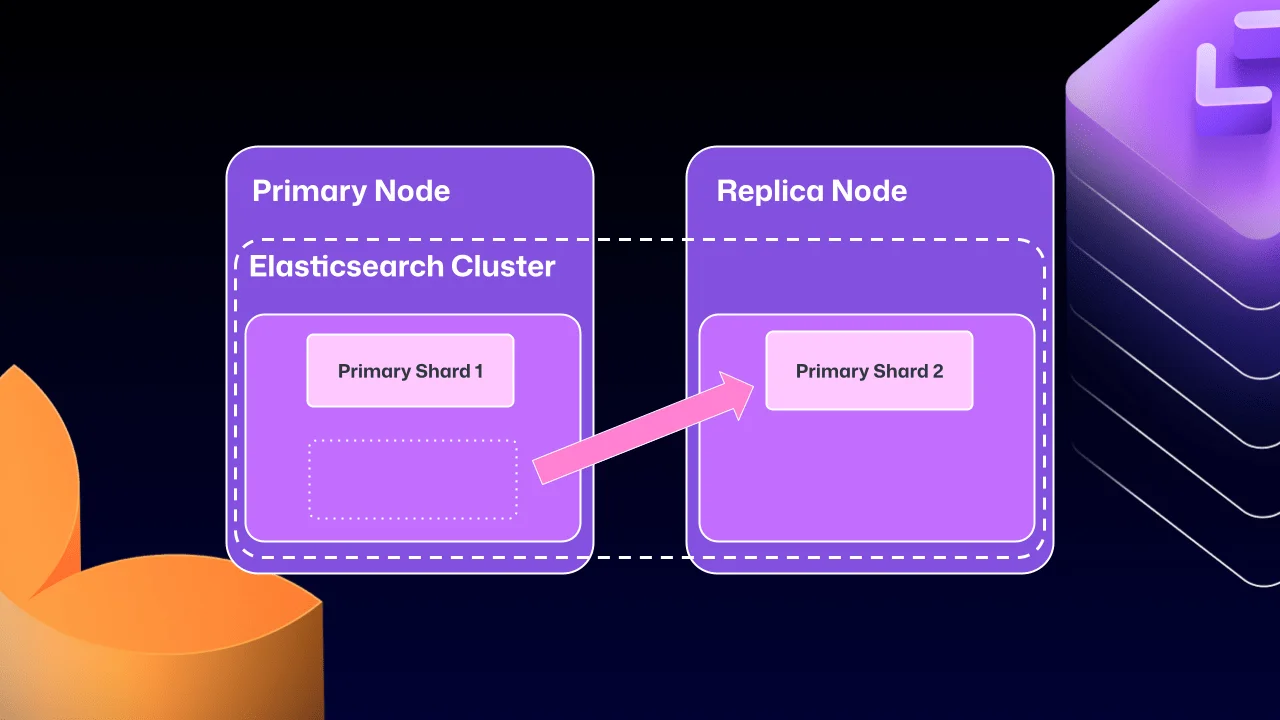
Over time, the liabilities of this cross-node clustering arrangement began to outpace its advantages. Elasticsearch's internal shard allocation logic — designed to optimize cluster health without awareness of GitHub's HA semantics — could autonomously migrate a primary shard to a replica node. A primary shard is the authoritative shard responsible for accepting and validating write operations. Once that shard landed on a read-only replica, taking that replica offline for routine maintenance could trigger a deadlock: the replica would refuse to start until Elasticsearch reported a healthy state, but Elasticsearch couldn't reach a healthy state until the replica rejoined the cluster. The system would stall indefinitely, requiring manual recovery.
Over several GitHub Enterprise Server release cycles, the engineering team pursued a series of mitigations. Health checks were introduced to verify Elasticsearch's state before critical operations. Automated correction routines were built to detect and remediate configuration drift. The team even explored a purpose-built "search mirroring" system intended to decouple GitHub Enterprise Server from the clustered Elasticsearch model entirely. Each effort moved the needle, but none fully resolved the underlying architectural tension. Database replication at this scale demands rigorous consistency guarantees, and the workarounds were fighting against the grain of how Elasticsearch was designed to operate.
What changed?
After years of iterative work, GitHub's infrastructure team has landed on a durable solution: Elasticsearch's Cross Cluster Replication (CCR) feature now powers High Availability replication in GitHub Enterprise Server.
"But David," you say, "that's replication between clusters. How does that help here?"
Fair question. The architectural shift here is significant. Rather than stretching a single Elasticsearch cluster across the primary and replica nodes, each GitHub Enterprise Server instance now runs its own independent, single-node Elasticsearch cluster. CCR then handles the replication of index data between those isolated clusters — a model that maps cleanly onto GitHub Enterprise Server's existing leader/follower semantics.
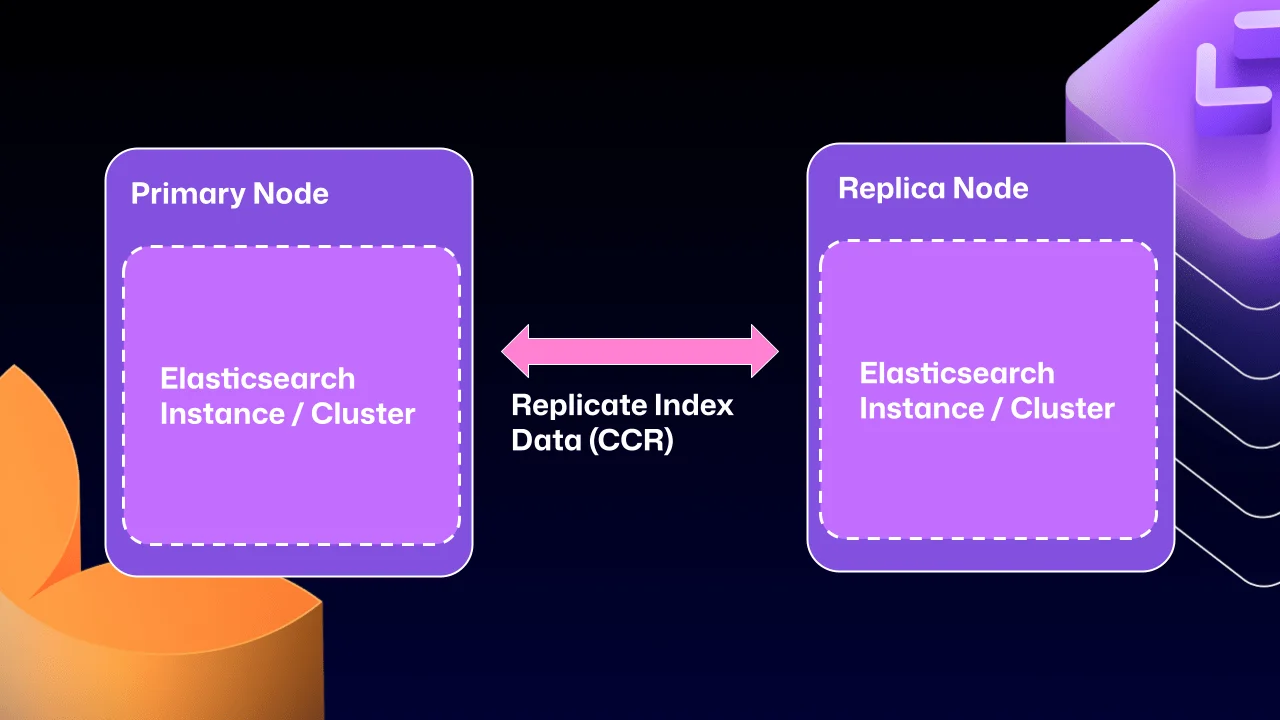
CCR propagates index data between nodes by reading from Lucene segments — the durable, immutable storage units that form Elasticsearch's underlying data layer. Because replication only occurs after data has been committed to Lucene, the system guarantees that only durably persisted writes are replicated downstream. This eliminates the category of partial-write or in-flight data consistency issues that could surface under the previous clustering model.
The practical implication is straightforward: because Elasticsearch now natively supports a leader/follower replication pattern, primary shards stay on the primary node where they belong. Administrators will no longer encounter scenarios where critical write-handling shards drift onto read-only replicas, and the deadlock conditions that followed from that drift are eliminated by design.
Under the hood
Elasticsearch ships with an auto-follow API, but it only applies to indexes created after a follow policy is established. GitHub Enterprise Server HA installations carry a long-lived set of indexes that predate any CCR configuration, so a bootstrap phase is required — one that attaches follower relationships to existing indexes before enabling auto-follow for any indexes created going forward.
Here's a representative sample of that bootstrap workflow:
function bootstrap_ccr(primary, replica):
# Fetch the current indexes on each
primary_indexes = list_indexes(primary)
replica_indexes = list_indexes(replica)
# Filter out the system indexes
managed = filter(primary_indexes, is_managed_ghe_index)
# For indexes without follower patterns we need to
# initialize that contract
for index in managed:
if index not in replica_indexes:
ensure_follower_index(replica, leader=primary, index=index)
else:
ensure_following(replica, leader=primary, index=index)
# Finally we will setup auto-follower patterns
# so new indexes are automatically followed
ensure_auto_follow_policy(
replica,
leader=primary,
patterns=[managed_index_patterns],
exclude=[system_index_patterns]
)
This bootstrap routine is one piece of a broader set of custom operational workflows GitHub has built around CCR. Elasticsearch handles document-level replication, but the full index lifecycle — failover sequencing, index deletion, upgrade coordination — falls outside its scope. GitHub's engineering team has had to design and implement each of those workflows independently, treating CCR as a replication primitive rather than a complete operational solution.
How to get started with CCR mode
Enabling the new CCR mode starts with contacting support@github.com to request access. The support team will configure your organization to download the required license.
Once the updated license is in place, set ghe-config app.elasticsearch.ccr true. From there, running a config-apply or upgrading your cluster to version 3.19.1 — the first release to ship with this architecture — will activate the new replication mode.
On restart, GitHub Enterprise Server will automatically migrate your Elasticsearch installation to CCR. The migration consolidates all index data onto the primary node, dissolves the cross-node cluster, and re-establishes replication using CCR. Migration duration will vary depending on the size of your GitHub Enterprise Server instance and the volume of indexed data.
CCR mode is opt-in for now, but GitHub intends to make it the default over the next two years. That transition window is intentional — the team wants substantive feedback from administrators operating real-world deployments before promoting it universally. If you're running a GitHub Enterprise Server HA installation, this is the right time to evaluate it in your environment.
The new HA architecture represents a meaningful reduction in operational complexity for GitHub Enterprise Server administrators — fewer edge cases to anticipate, fewer recovery procedures to rehearse, and a search infrastructure that behaves predictably under the conditions that previously caused the most trouble.