Google Workspace Gets Smarter: Gemini Brings Powerful New Document Creation and Editing Tools
Google's productivity suite is getting a deeper dose of AI, and this time the changes go beyond surface-level feature additions. Gemini is being woven more tightly into Drive, Docs, Sheets, and Slides — with a redesigned interface and expanded capabilities that shift the starting point of document creation from a blank page to a prompt. It's a significant repositioning of what Workspace is, moving it from a collection of productivity tools toward something closer to an AI-native work environment.
How the new Gemini workflow actually works in Docs
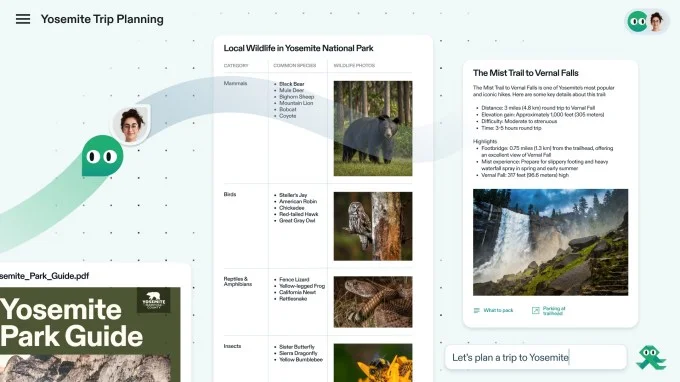
The most visible change is where Gemini shows up. Rather than a toolbar of AI options at the top of a new document, users will now see a chatbot-style text box at the bottom of a fresh page. The idea is to make the interaction feel more like a conversation and less like a menu of features you have to hunt through. It's a subtle but deliberate UX decision — one that signals Google wants Gemini to feel like a collaborator you talk to, not a plugin you activate.
From that interface, you describe what you want and Gemini generates a first draft. What makes this more useful than a generic AI writing tool is the context it can pull in — Gmail threads, other documents, Google Chat conversations, and the web can all feed into what gets generated. That cross-account awareness is a meaningful step up from isolated document generation. In practice, it means a project brief could automatically reference the latest email thread with a client, or a report could pull in data points from a linked spreadsheet without the user having to copy anything manually.
Editing gets a similar treatment. You can follow up with additional prompts to restructure or reformat the whole document, or highlight a specific section and ask for targeted changes. There's also a style-matching feature, which could be genuinely useful in collaborative environments where multiple contributors are working on the same document and consistency matters — think legal teams, marketing departments, or any organization with strict brand voice guidelines. Google has also confirmed that all Gemini suggestions remain private until the user explicitly approves them — a small but important detail for anyone working on sensitive material. That approval layer matters more than it might seem, especially in regulated industries where accidental data exposure carries real consequences.
Gemini's expanding role across Drive, Sheets, and Slides
The changes aren't limited to Docs. In Sheets, Gemini can now help generate formulas, summarize data ranges, and build out table structures from a plain-language description. For users who aren't spreadsheet power users, that's a meaningful reduction in friction — the gap between knowing what you want from your data and knowing how to extract it has always been a barrier. In Slides, the AI can generate full presentation outlines and populate them with content pulled from existing documents or prompts, which addresses one of the most time-consuming parts of deck creation: the blank slide problem.
Drive is getting smarter search and summarization capabilities, so users can ask questions about files they haven't opened in months and get relevant answers without digging through folder structures. Taken together, these updates suggest Google is treating the entire Workspace suite as a unified AI surface rather than a set of individual apps that happen to share a login.
What this signals for where Google is taking Workspace
Google moved quickly to bundle Gemini into Workspace after raising plan prices in early 2025, framing the AI features as part of the value proposition for the higher cost. This latest overhaul suggests that first wave of integration was more of a foundation than a finished product. The pace of iteration also signals competitive pressure — Google isn't treating this as a slow rollout.
The shift toward a conversational, context-aware interface reflects a broader pattern across the industry — AI tools are moving away from being discrete features you opt into and toward becoming the default starting point for work. Google is betting that users will find it more natural to describe what they need than to build it from scratch, and the cross-product context pulling from Gmail and Chat is the kind of integration that standalone AI writing tools simply can't replicate. That's a structural advantage, not just a feature advantage.
For businesses already deep in the Google ecosystem, that interconnectedness is a real differentiator. The question is whether the quality of the output — drafts, reformatted sections, style-matched edits — holds up well enough in practice to change how people actually work, or whether it becomes another set of features that look impressive in a demo and get ignored in daily use. Early AI feature rollouts across the industry have a mixed track record on that front, and user trust is hard to rebuild once it's lost to a few bad drafts or misread contexts.
The rollout of these revamped Gemini features across Drive, Docs, Sheets, and Slides puts Google in a more direct conversation with tools like Microsoft Copilot in Office 365, where similar AI-assisted document creation has been a selling point for some time. Google's advantage, if it plays out, is the depth of integration across its own ecosystem — something that's harder to replicate when you're building on top of someone else's platform. Microsoft has the enterprise relationships and the Office install base; Google has the tighter loop between communication and creation tools.
What it means for how we work — and who benefits most
The implications here extend beyond feature comparisons. If AI-assisted drafting becomes the default starting point in Workspace, it changes the nature of the work itself. Writers, analysts, and project managers who spend significant time on document scaffolding — outlines, formatting, first drafts — could reclaim meaningful hours. But it also raises questions about skill atrophy, over-reliance on AI-generated structure, and how organizations will need to adapt their review and approval processes when more content is AI-initiated.
For smaller teams and solo operators, the productivity gains could be disproportionately large. A one-person operation that previously couldn't afford to produce polished, well-structured documents at scale now has a capable first-draft engine built into the tools they're already paying for. That's a genuine leveling effect. For larger enterprises, the value proposition is more about consistency and speed at scale — getting a 20-person team to produce documents that feel coherent and on-brand without a dedicated editor in the loop.
There are also privacy and governance considerations that organizations will need to work through. The cross-product context awareness that makes Gemini more useful also means more of your organizational data is being processed to generate outputs. Google's privacy commitments around Workspace data are well-documented, but IT and compliance teams will want to understand exactly what's being accessed, when, and how it's handled before rolling this out broadly.
Whether users embrace the new workflow or find it intrusive will likely depend on execution — specifically how well Gemini reads context, how much manual correction its drafts require, and how smoothly the approval mechanism works in real collaborative settings. The architecture is sound, the integration depth is real, and the competitive timing is deliberate. The proof, as always, will be in the day-to-day — in whether the tool earns enough trust to become a habit, or gets quietly turned off after the novelty fades.